Your merchandising team drops one hundred SKUs next Friday. Your creative lead has three days, one freelancer, and a folder of packshots. The obvious move? Open the AI tool and write one prompt per product. By SKU forty, every image looks like a different brand. By SKU seventy, someone asks why the light keeps changing. By SKU one hundred, you have volume, and zero soul.
AI ecommerce batch content does not fail because models are weak. It fails because teams treat scale as one hundred separate creative decisions instead of one brand kit multiplied by SKU-specific references. Batch thinking fixes that. One spine. Many products. Creative direction that survives the drop.
Key Takeaways
>
– Batch thinking means one locked brand kit (palette, light logic, no-go rules) applied across hero SKU families, not one bespoke prompt per product.
– Adobe’s 2026 Creators’ Toolkit Report found 57% of creators say AI outputs need moderate or extensive editing before publish. Most of that rework traces to missing batch structure, not bad luck (Adobe Creators’ Toolkit Report, 2026).
– Group SKUs by scene family, not category tree. Reference-heavy mode at scale beats exploratory prompting once direction is locked.
– Soul survives scale through curator gates: explorer generates, approver enforces kit, slot map assigns channel jobs before render.
If you have read AI Ecommerce Design Is Not AI Image, you know commercial creative is a system. This playbook answers the scaling question inside that system: how does one brand kit cover a hundred SKUs without the gallery looking like a stock-site accident?
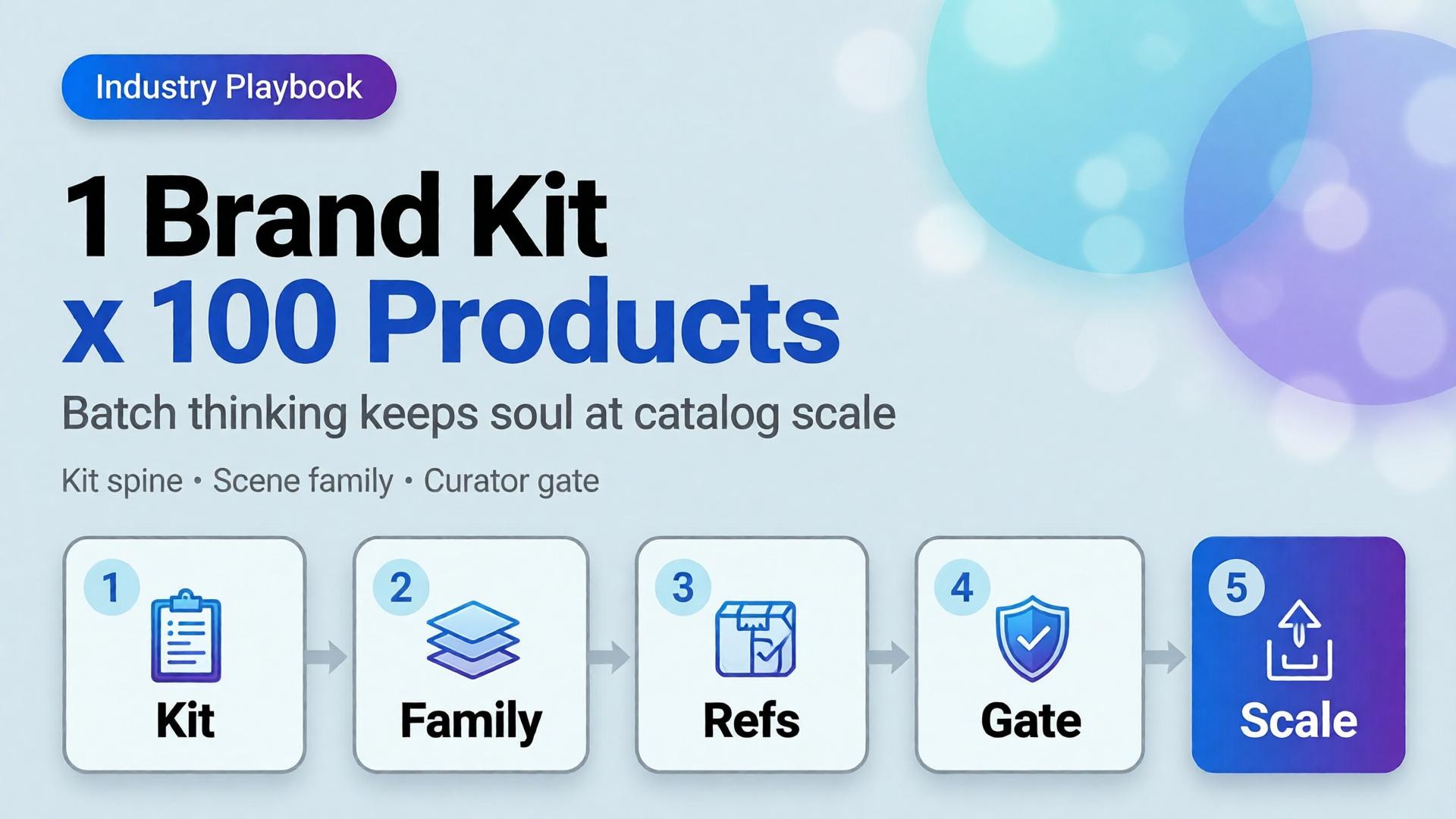 One kit, many SKUs: batch thinking is multiplication, not repetition.
Why Does Scaling 100 SKUs With AI Feel Like 100 Different Brands?
Because prompt-per-SKU workflows optimize for individual frames, not set coherence. Each new product invites a fresh adjective stack, a new scene guess, a new light mood. The model complies. The catalog fractures.
Adobe surveyed more than 16,000 creators globally in 2026 and found 75% describe creative AI as integrated or essential. Yet the same report shows 42% believe AI-generated work makes it harder for distinctive voices to surface (Adobe Creators’ Toolkit Report, 2026). That is not a model problem. That is a direction problem wearing a volume badge.
The math is simple. One hundred SKUs times three scene types equals three hundred generation jobs. Without a brand kit spine, you are running three hundred micro-briefs. With batch thinking, you run one kit times three scene templates times SKU references. Same output count. One world.
Citation capsule: Scaling AI ecommerce batch content fails when teams prompt per SKU. Adobe’s 2026 data shows 57% of creators still edit AI outputs heavily before publish. Batch structure reduces that rework by locking direction before generation starts.
What Is Batch Thinking, and How Is It Different From Batch Generating?
Batch generating is a button. You queue one hundred jobs, walk away, hope the folder looks on-brand. Batch thinking is a design decision made before the queue opens.
| Batch generating | Batch thinking |
|---|---|
| One prompt per SKU | One brand kit per drop |
| Scene invented at render time | Scene families defined upfront |
| References optional | SKU references mandatory |
| Curator reviews output | Curator approves kit first |
| Success = file count | Success = set coherence |
Batch thinking borrows from how studios shoot lookbooks: one lighting setup, one set family, many products walked through the same world. AI does not change that logic. It amplifies the cost of skipping it.
The SCENE method still applies (Story, Context, Emotion, Narrative, Extension), but at batch scale, SCENE rows attach to scene templates, not individual SKUs. SKUs inherit the template and swap only what must change: product geometry, colorway, label legibility.
Soul is not a vibe word. It is creative direction that survives multiplication. When every SKU shares light logic and palette enforcement, the buyer feels one brand made one hundred considered choices, not one algorithm rolled dice one hundred times.
 Batch generating fills folders. Batch thinking fills a world.
What Belongs in the Brand Kit Spine?
The brand kit is the non-negotiable layer every SKU inherits. Think of it as the creative contract the model cannot negotiate away.
Palette and color behavior
Lock primary, secondary, and accent hex values. Define how product colorways interact with environment neutrals. State whether backgrounds warm or cool relative to skin and packaging. Without this, SKU seventeen drifts mint while SKU eighty-two goes sage. Both read “green.” Neither is yours.
Light logic
One sentence beats ten adjectives. Example: Late-morning window light, 5200K, soft shadow falloff, no harsh rim. Every scene family in the drop repeats that sentence. Light logic is where the brand consistency trap hides when teams scale fast.
No-go rules
List what never appears: competitor visual tropes, off-brand props, wrong era furniture, illegible label blur, hands without grooming rules. No-go lists are boring to write and expensive to skip.
Character rules (when faces matter)
If the drop uses models, define age band, styling lane, expression range, and casting consistency. Character is not “a woman in her thirties.” Character is one approved casting lane referenced across hero families, same as a studio would book one talent day.
Slot map (channel jobs)
Before rendering, assign which scene types serve which slots: marketplace hero, PDP gallery row two, paid social vertical, email hero. The visual commerce 2026 split still applies: compliance truth plus lifestyle story. Batch thinking names those slots before SKU one renders.
 The kit is short. The enforcement is daily.
How Do Hero SKU Families Replace Category-Tree Thinking?
Merchandising organizes by category: tops, bottoms, accessories, home, beauty. Creative direction organizes by scene type: tabletop ritual, on-body movement, shelf context, outdoor carry, detail macro.
Hero SKU families group products by which scene template they walk through, not which nav tab they sit under.
Example family map for a mixed apparel-and-accessories drop:
| Hero family | Scene template | Example SKUs |
|---|---|---|
| Morning flatlay | Bathroom marble, soft steam | Serums, scarves, small leather goods |
| Commute carry | Street light, bag scale shot | Totes, crossbodies, laptop sleeves |
| On-body movement | Walking frame, natural stride | Dresses, outerwear, sneakers |
| Detail proof | Macro texture, stitch or grain | Knitwear, leather, ceramics |
| Compliance hero | Pure white, 85%+ frame fill | All marketplace main images |
A linen dress and a ceramic mug may share the morning flatlay family if the buyer moment matches: quiet ritual, not product taxonomy. That is how you cover one hundred SKUs with twelve scene templates instead of one hundred invented rooms.
Fashion teams discovered this through lookbook thinking. Ecommerce batch drops use the same move at warehouse scale.
Citation capsule: Hero SKU families group products by shared scene templates (morning flatlay, commute carry, on-body movement), not by merchandising category trees. One brand kit can cover 100 SKUs with roughly 10-15 scene families instead of 100 unique prompts.
When Should You Switch to Reference-Heavy Mode at Scale?
Exploration is for discovery. Reference-heavy mode is for production.
When to Use Reference Images vs Let AI Explore draws the line: explore when the world is unknown; reference when the world is locked. A hundred-SKU drop is never the moment to explore.
At scale, every generation job carries:
- Brand kit block: palette, light, no-go (pasted identically)
- Scene template reference: one approved frame per hero family
- SKU reference: packshot or phone capture of the actual product
- SCENE row: story and emotion for that family only
The SKU reference handles geometry, label, and colorway truth. The scene template handles world coherence. The brand kit handles identity. Prompt text becomes assembly, not invention.
Adobe’s 2025 survey found 52% of creators use creative AI primarily for asset generation, while 48% use it for ideation (Adobe MAX 2025, 2025). Batch drops belong in the generation lane. Ideation already happened when the kit and families were approved.
[CHART: Bar comparison – rework hours per 100-SKU drop: prompt-per-SKU workflow vs brand-kit batch workflow – illustrative workflow efficiency data]
What Does the Curator Workflow Look Like for a 100-SKU Drop?
Volume without curation is how distinctive brands become generic ones. A 100-SKU drop needs gates, not hope.
Gate 1: Kit approval (before any SKU)
Creative lead signs off palette, light logic, no-go list, and slot map. No generation until this passes. One meeting. One document.
Gate 2: Family template approval (per hero family)
Generate three to five explorations per family once. Pick one winning template per family. That template becomes the reference for every SKU in the family.
Gate 3: SKU batch review (per family, not per SKU)
Run ten to twenty SKUs through the same family template. Review as a set at thumbnail grid scale. Ask: do these look like one brand shot one afternoon?
Gate 4: Slot compliance check
Marketplace heroes against white-background rules. PDP lifestyle against emotion brief. Social crops against safe zones. The phone-to-campaign mindset applies: shoot (or reference) once, adapt to slots. Do not re-invent per channel.
Gate 5: Publish set curation
Ship three to five images per SKU, not twenty “good enough” frames. Adobe reports 85% of creators insist the final creative decision must remain theirs (2026). Curator gates protect that judgment instead of drowning it in volume.
Freelancers running multiple clients should save the kit-plus-family structure as a reusable template, the same move described in One Workflow Template for Five Clients.
 Curators judge sets, not singles. The grid tells the truth.
What Breaks When Batch Thinking Is Missing?
Four failure modes appear in almost every distressed 100-SKU drop.
Brand drift
Individual images pass review. The collection fails it. Light warms on SKU twelve. Shadows harden on SKU sixty-one. Accent colors creep toward model defaults. This is the brand consistency trap at warehouse scale. Fix it by returning to the kit, not by re-prompting adjectives.
Orphan scenes
A beautiful kitchen frame for a product that never belongs in a kitchen. Orphan scenes happen when prompts invent context per SKU instead of inheriting family templates. They convert like wallpaper: pretty, purposeless.
No slot map
The team renders cinematic landscapes, then discovers marketplace needs RGB 255 white heroes and paid social needs vertical safe zones. Rework doubles. The global visual commerce platform market is projected to grow from $4.6 billion in 2025 to $13.8 billion by 2034 at a 12.8% CAGR (DataIntelo, 2025). That growth rewards teams who plan slots before pixels, not after.
Prompt-per-SKU fatigue
By SKU fifty, whoever writes prompts starts cutting corners. Adjectives compress. References drop off. Quality variance becomes visible to buyers scrolling the catalog. Fatigue is a workflow bug, not a talent bug.
Aggregated ecommerce A/B data commonly shows lifestyle context additions lifting conversion 15–30% over packshot-only galleries when scenes share coherent world logic (industry aggregates, 2025–2026). Incoherent batches waste that uplift.
What Is the 5-Step Batch Thinking Playbook?
Copy this sequence for the next drop.
Step 1: Write the brand kit (one page). Palette, light logic, no-go rules, character lane if needed, slot map. Approve before opening any model.
Step 2: Map hero SKU families. List every SKU. Assign each to a scene family by buyer moment, not category tree. Target ten to fifteen families for a hundred-SKU mixed drop.
Step 3: Lock family templates. Explore three to five options per family. Curator picks one reference frame per family. No SKU work until templates hold.
Step 4: Run reference-heavy batches. Each job = kit block + family template + SKU reference + SCENE row. Batch by family, not by merchandising sort order.
Step 5: Curate publish sets. Review at grid scale. Enforce slot compliance. Ship three to five frames per SKU. Save the kit and family map as next season’s template.
Teams consolidating tools should read Orauria vs a Scattered AI Stack for why batch thinking needs one workflow surface, not six tabs with six different light moods.
 Five steps, one world. The playbook is thinking, not clicking.
Run your next 100-SKU drop on Orauria: Try Orauria
Frequently Asked Questions
Is batch thinking only for large catalogs?
No. The same logic applies to twenty-SKU seasonal drops. Batch thinking scales down cleanly: one kit, three families, curated sets. The failure mode (prompt-per-SKU drift) hurts small drops too; it just arrives faster.
How many hero families do I need for 100 SKUs?
Plan ten to fifteen families for a mixed catalog. Fewer if the drop is single-category (eight families for apparel-only). More than twenty families usually means you are back to per-SKU invention wearing a taxonomy costume.
Can I still explore creatively inside a batch drop?
Yes, but only at Gate 2 (family template approval). Exploration is bounded, intentional, and once per family. Production SKUs inherit the winner. That is how soul survives scale without killing discovery.
What if SKUs need genuinely different contexts?
Split the SKU into a second family with its own template. Do not write a one-off prompt. If a product truly needs a unique world, it is a new family row, not an exception that breaks the kit.
Does batch thinking replace white-background marketplace heroes?
No. Compliance heroes are a slot, not a scene family competitor. The visual commerce 2026 dual-layer model still applies: white truth for marketplaces, lifestyle families for brand channels. One kit governs both.
How do freelancers charge for 100-SKU batch work?
Price the kit, family map, and curation system, not per-image generation. Clients who buy volume without direction buy rework. Adobe’s 2026 data shows 57% of creators already edit AI outputs heavily; batch structure is billable creative direction, not a discount line item.
Conclusion
One hundred SKUs is not one hundred prompts. It is one brand kit, ten to fifteen hero families, reference-heavy production, and curator gates that protect the final call.
Batch thinking is how ai ecommerce batch content keeps soul at scale. The kit holds identity. Families hold coherence. References hold product truth. Curators hold judgment.
Write the kit before SKU one. Group by scene, not category. Explore once per family, then multiply. Review the grid, not the single.
That is not slower than prompt-per-SKU chaos. It is the only speed that ships a catalog buyers trust.
References
- Adobe, 2026 Creators’ Toolkit Report, June 16, 2026. https://news.adobe.com/news/2026/06/creators-toolkit-report-2026
- Adobe, Inaugural Creators’ Toolkit Report (Adobe MAX 2025), October 28, 2025. https://news.adobe.com/news/2025/10/adobe-max-2025-creators-survey
- DataIntelo, Global Visual E-Commerce Platform Market Report, 2025. https://dataintelo.com/report/global-visual-e-commerce-platform-market
- Amazon Seller Central, Product Image Requirements, 2025. https://sellercentral.amazon.com/help/hub/reference/G1881
- acceleroi, Shopify Beauty & Skincare Conversion Rate Benchmark 2026. https://www.acceleroi.com/posts/benchmarks/shopify-beauty-skincare-conversion-rate